Smart Home App Mobile UI KIT
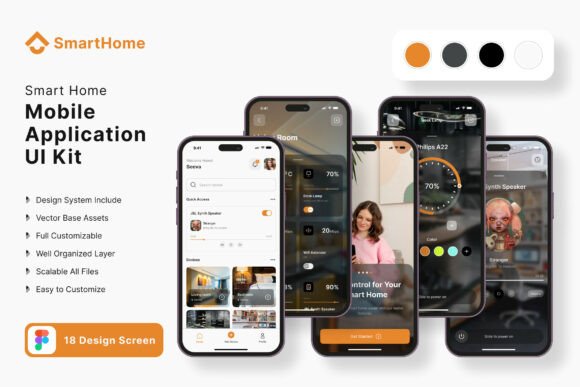
Imagine launching a polished, feature-rich mobile application for a smart home system in a fraction of the usual development time. This is the creative promise of the Smart Home Application Mobile UI KIT, a comprehensive design resource that transforms the initial, often daunting, phase of app creation into a streamlined and enjoyable process. For designers, developers, and entrepreneurs, this kit is more than a collection of screens; it's a foundation for bringing innovative home automation ideas to life with professional flair.
At its core, this UI KIT provides 18 pixel-perfect screen designs, meticulously crafted to cover the essential user journeys of a smart home application. From intuitive device dashboards and climate control panels to security system interfaces and scheduling modules, each template offers a visually coherent and user-friendly starting point. The true value, however, lies in its exceptional flexibility. With over 80 UI elements, 100% vector layers, and fully scalable vectors, you are equipped to build a unique interface without starting from zero.
Why This Design Asset Stands Out
What makes this particular kit a noteworthy addition to your design assets is its commitment to modern typography and editability. Built in Figma, it allows for real-time collaboration and effortless customization. You can adjust the color style system-wide, swap out icon vectors, and modify layouts to match specific branding guidelines. The inclusion of free fonts and symbol objects means you can maintain visual consistency across your entire project, ensuring your mobile application feels cohesive and professionally designed.
This resource is particularly valuable for several creative scenarios:
- Rapid Prototyping: Quickly assemble interactive prototypes to pitch a smart home app concept to stakeholders or investors.
- Client Projects: Accelerate the design phase for freelance or agency work, delivering high-fidelity mockups faster.
- Personal Ventures: Entrepreneurs and developers can use it as a direct blueprint for their own product, focusing energy on functionality rather than foundational design.
- Learning & Education: New designers can study the structure and components to understand best practices in mobile UI for complex systems.
Tips for Integrating the KIT into Your Workflow
To maximize the potential of this Smart Home Application Mobile UI KIT, consider these practical tips. First, don't just use it as-is; treat it as a flexible framework. Add your brand's unique touch by incorporating a distinct color palette and selecting a complementary font pairing that enhances readability and mood. Test how the UI elements interact with your specific content—does a particular control panel layout work better for your feature set? Use the scalable vectors to resize and reposition components until the flow feels natural for your end-user.
Furthermore, think beyond the immediate application. The clean, modern aesthetic of these screens can inform other parts of your brand identity. The color styles and iconography can be adapted for social media graphics, the layout principles can inspire web design for a companion website, and the overall visual language can strengthen your brand's presentation across packaging or promotional materials. A well-designed interface builds trust, and this kit provides the polished foundation to achieve that professional look consistently.
In the landscape of digital design, having a reliable and beautiful starting point is invaluable. The Smart Home Application Mobile UI KIT offers that and more—it provides a canvas for creativity, a tool for efficiency, and a pathway to a more professional outcome. By choosing a resource that prioritizes quality, scalability, and editability, you empower yourself to focus on what truly matters: creating an exceptional and intuitive user experience that stands out in a competitive market.